Laptop Battery Chip Reset License (2 Years)
id: 923237
Laptop Battery Chip Reset License (2 Years)
General information
Instructions
Video
Warranty
USD 399.00
General information


Video

Availability in stock:
HK
Digital product. No refunds, no returns.
The order will be processed within 1 hour during business hours, starting from the moment we receive your full payment. and all the required information. We will send the beginner instructions to your email.
This license allows you to Reset, Repair or Program a Laptop Battery Chip using the NLBA1 Laptop Battery Analyzer.
Attention! Before buying, you need to read the instructions
USD 399.00
This license allows you to Reset, Repair or Program a Laptop Battery Chip using the NLBA1 Laptop Battery Analyzer.
This license is valid for 2 years.
Advantages
- Automatic Chip Name and Firmware Detection, no need to open the battery
- Ideal for laptop repair shops
- A wide range of chip families are supported
Main Features
Chip Reset / Repair
- Unsealing chips
- Most of the chips are unsealed using the master password within a few seconds.
- By pressing the Unseal button, the chip is unsealed and switched to FAS (Full Access) mode.
- Read / Write EEPROM/DataFlash
- After reading, the content of the EEPROM can be stored in a file on the computer.
- In the same way, the saved EEPROM image can be loaded and written using the Write function.
- Clearing chip errors (PF flags)
- This feature can clear the PFF (Permanent Failure Flag). A laptop battery stops working and sets a PFF when it detectes a failure.
- Over-charged cells is the most common failure. After fixing/replacing bad cells and the checking the thermal fuse, clearing PFF is mandatory.
- Edit parameters
- The parameters that can be changed after unsealing are: manufacturer date, cycle count, and FCC.
- Note that resetting the Cycle Count parameter to 0 will not bring the battery back to life. Only clearing errors will make the battery work again (if the cells are good).
Demonstration

How It Works
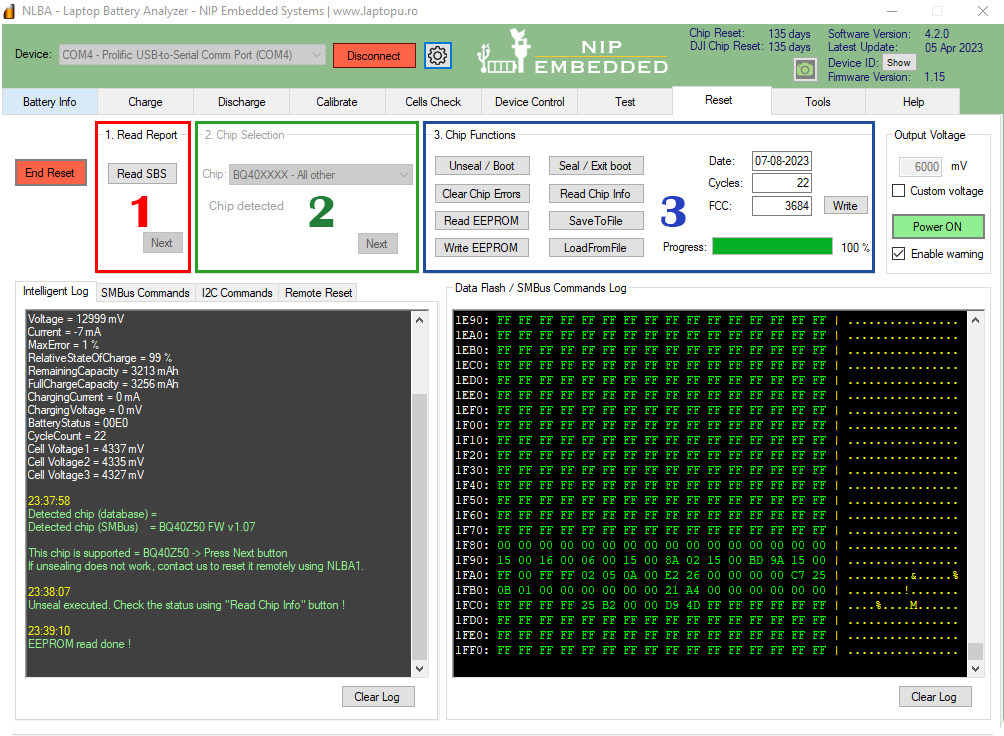
- Step 1 - Read Parameters (the software marks the failure)
- Step 2 - Chip Selection (it is detected automatically most of the time)
- Step 3 - Unseal the battery and Clear Chip Errors
Supported Chips
| Texas Instruments BQ208XX | bq2083, bq2084, bq2085, bq20695a, bq20853, bq20857, bq20864, bq20869, bq20870, bq20882, bq20886, bq20887, bq20889, bq20891, bq20894, bq20895 |
| Texas Instruments BQ20ZXXX | bq20z40, bq20z45, bq20z451 (Apple Macbook Batteries, all firmware version), bq20z453, bq20z456, bq20z459, bq20z60, bq20z65, bq20z655, bq20z70, bq20z701, bq20z704, bq20z75, bq20z80, bq20z90, bq20z91, bq20z95, bq20z951, bq20z955 |
| Texas Instruments BQ803XX (Sanyo) | bq8030, bq8030a (Including Lenovo bq8030a) |
| Texas Instruments SN803XX | SN8030, SN80305, SN80306 |
| Texas Instruments BQ304XX | bq30420, bq30421, bq30422, bq30423, bq30424, bq30471, bq30472 |
| Texas Instruments (Firmware Sanyo) | bq8050, bq8050-D1, bq8055, bq8055a (Including Lenovo bq8055a) |
| Texas Instruments BQ9000 Sanyo | BQ9000 Sanyo |
| Texas Instruments BQ40XXX | bq4050, bq4055, bq40z50, bq40z55, bq40z551, bq40z555, bq40z556, bq40z557, bq40z453, bq40696a, bq40Z695A, bq40Z696A, bq40Z697A, bq40Z795A, bq40320, bq40370 |
| Apple Macbook Batteries | All Apple Macbook Batteries are supported (chips: bq20z451 and bq40z651, all firmwares) All Macbook batteries up to 2023 are supported |
| Texas Instruments BQ30ZXXX | bq30z55, bq30z551, bq30z554, bq30z55, bq3050, bq3055, bq3060, bq30695a |
| Renesas | 045A20 (LGC) |
How to buy
- After we receive your payment in full and process your order, we will send a notification to your email with an activation code.
Supported OS
- Windows 7/8/10, (32/64-bit)
Instructions
How to buy
- After we receive your payment in full and process your order, we will send a notification to your email with an activation code.
How It Works
- Step 1 - Read Parameters (the software marks the failure)
- Step 2 - Chip Selection (it is detected automatically most of the time)
- Step 3 - Unseal the battery and Clear Chip Errors

Video
Customers Feedback
Compare
No items in compare list
Compare