XiaomiKey - Generate FRP KEY by Token
General information



Digital product. No refunds, no returns.
The order will be processed within 1-2 minutes during business hours, starting from the moment we receive your full payment. and all the required information. We will send the beginner instructions to your email.
XiaomiKey is a professional tool for decoding and flashing Xiaomi devices such as: Qualcomm EDL Auth Flash, MTK Auth Flash, Decode Google ID and Decode Bootloader.
Redmi Note 12 4G (tapas_global) is not supported
How to buy
- While placing your order, please provide the token of your Xiaomi phone.
- Once your order is placed, don`t reboot your phone, otherwise, the token will change.
We won`t refund money if you`ve received a key (code) generated for the token that doesn`t exist anymore. - As soon as we process your order, you will receive a one-time code to remove FRP on your phone using XiaomiKey software.
How it works
- Download XiaomiKey software
- Run this software.
- Connect the phone.
- Choose FRP Key
- Copy FRP Token
- Enter this token while placing your order.
- As soon as we process your order, we will send a one-time FRP Key.
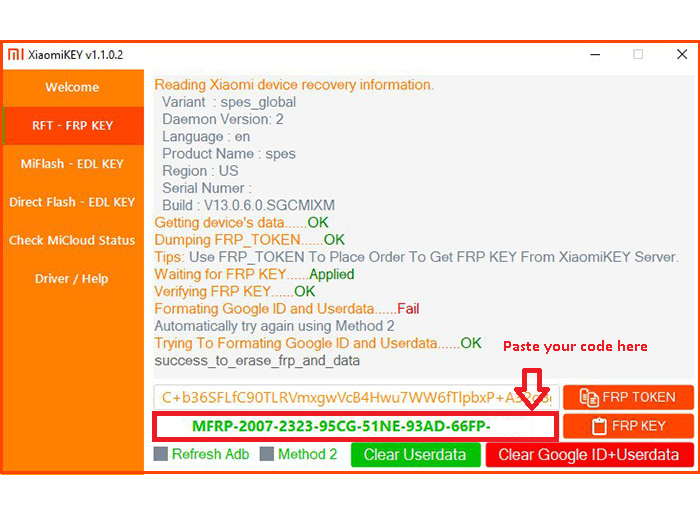
- Copy-paste this key as shown below.
- Perform the operation
Note! This product is not covered by the warranty and cannot be returned!
*The developer provides support only for those phones which are on the list of supported. Not all servicing features can be applied to some supported models, due to differences of hardware/software versions. You can find a complete list of supported models on the official product page or the GSM forum.
Detailed information on the further use of the digital product will be sent to your email, specified during registration, when we confirm your payment and process your order.
Instructions
How it works
- Download XiaomiKey software
- Run this software.
- Connect the phone.
- Choose FRP Key
- Copy FRP Token
- Enter this token while placing your order.
- As soon as we process your order, we will send a one-time FRP Key.
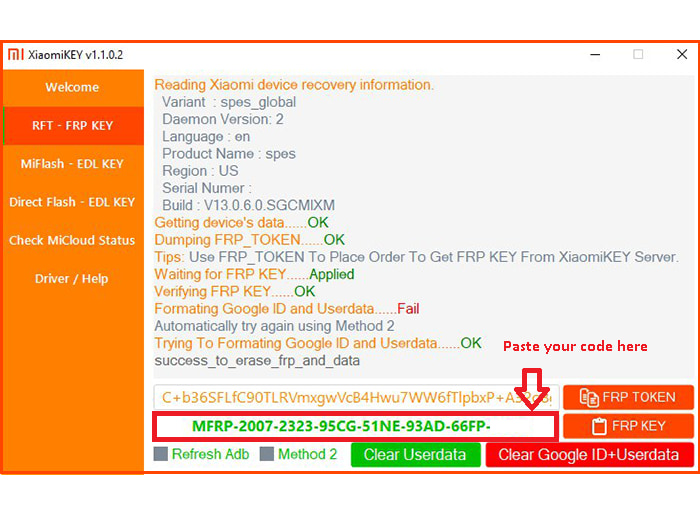
- Copy-paste this key as shown below.
- Perform the operation
Video